
ANKER Discount Code & Coupons October 2026
Power up for less with a verified ANKER coupon code (WSGO15), checked on October 2026. Use it at checkout to unlock 15% off eligible chargers, cables, headphones, and travel-friendly tech.
Active ANKER Coupons and Offers

Expired ANKER Coupons
Anker coupon code: 15% off the Top Sale selection
Apply the official code to eligible products on Anker’s Top Sale page. It cannot be combined with other promotions.
How To Add an Anker Coupon Code
If you’ve never used a promo code on Anker before, don’t worry — the process is actually very simple once you know where the discount box appears. I checked the cart flow shown in the screenshot, and the good news is that you don’t need to go hunting through multiple pages to find it. The coupon area is built directly into the My Cart panel, so you can apply your code before checkout and immediately see whether it worked. Here’s exactly how to do it step by step.
-
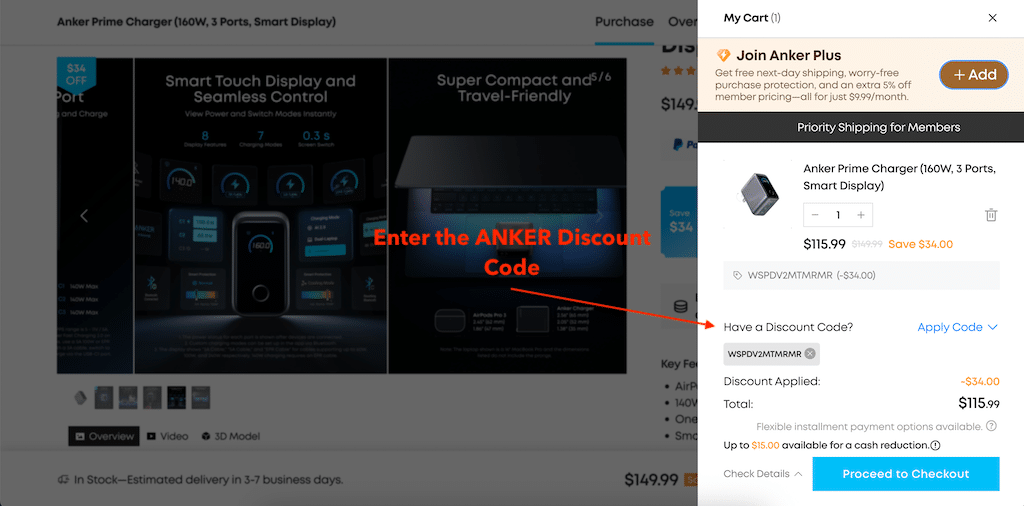
1Start by shopping on the Anker website as you normally would. Open the product you want, choose the correct version if there are different options, and add it to your cart. In the example shown, the item is the Anker Prime Charger (160W, 3 Ports, Smart Display). As soon as the product is added, Anker opens a My Cart sidebar on the right side of the screen. This is where you’ll review your order and apply any available discount code.
-
2Once the cart opens, take a moment to look over the details. You should see the product name, quantity controls, and the current price for the item. In the screenshot, the charger is listed at $115.99, with a note showing Save $34.00 compared with the original price of $149.99. This is useful because it lets you immediately compare the normal price with the discounted price once a code is applied. I always recommend doing this before entering a coupon code, especially for beginners, because it gives you a clear “before and after” view. That way, you’ll know whether the code actually changed the total or if another promotion was already included automatically.
-
3Scroll your eyes a little lower in the cart panel and look for the line that says “Have a Discount Code?” On the right side of that line, you’ll see “Apply Code.” This is the section you need to use. It’s easy to miss if you’re focused only on the big Proceed to Checkout button, but this small area is where Anker lets you add a promo code manually.
-
4Once you open the code section, type or paste your Anker discount code into the available field. If possible, copy and paste the code exactly as it appears on the coupon page rather than typing it by hand. That is always the safest option, because promo codes often include a mix of capital letters and numbers, and even one wrong character can stop the code from working. In the screenshot, the code WSPDV2MTMRMR appears already entered and accepted. That gives a good example of how the code will look once Anker recognizes it. If your code is valid, it should stay visible in the cart rather than disappearing right away.
-
5After entering the code, don’t just assume it worked — always look at the order summary. On Anker, the cart makes this part pretty easy to verify. In the screenshot, there is a clear line that says “Discount Applied: -$34.00” and the Total shown below is $115.99. That’s exactly what you want to see: a separate discount line and an updated final amount.
-
6Once the code has been applied and the lower total is showing correctly, you can move forward by clicking “Proceed to Checkout.” At this stage, your discount should already be included in the order summary, so there is no need to re-enter the code later unless Anker removes it during checkout for some reason. In most cases, if the discount is visible in the cart, you’re good to continue. This is the best time to do one final check: confirm the product, quantity, discount amount, and final total. After that, you can complete the purchase as usual.
Frequently Asked Questions about ANKER
Does ANKER Offer Discount Codes?
Currently, there are 5 discount codes available for ANKER in October 2026, and one of the latest verified coupon codes is WSGO15, offering up to 15% off.
What are the latest coupons and discount codes for ANKER?
Currently there are the following active discount codes and promotional offers for ANKER:
How do I get an Anker coupon code?
Why is my Anker coupon code not working?
Can I use more than one Anker coupon on the same order?
Does Anker offer a first-order or new customer discount?
Does Anker offer student or teacher discounts?
Can Anker promo codes be combined with other discounts?
Coupons and Offers from stores similar to ANKER





Gear up for less with the active BASEUS discount code (AM52), validated on October 2026.

Save on your purchase using a verified Dyson discount code WELCOME-5, checked October 2026.

Get more miles for less with a verified ENGWE discount code NEWENGWE, checked October 2026.

Upgrade your home tech with Eufy deal code WS24T8170-2 (validated October 2026).

Ready for your next adventure? View GoPRO offers

Save on your purchase with a working Huawei voucher (A2026SEP), checked October 2026, giving 15% off on huawei.com for select phones, wearables, and gear.

Upgrade your tech without overpaying: apply Lenovo code IDEAFALL (reviewed October 2026) to save 20% on qualifying laptops, PCs, or accessories at lenovo.com.

If you're upgrading your kit, use the verified ADORAMA coupon EBK27GP5M4 (last checked October 2026) to save 5% on selected cameras, lenses, audio gear, and accessories at adorama.com before…
Discount Code Expert for ANKER

Content Editor
Horia reviews and updates this coupon page, checks active offers, validates promotional details, and edits the page content to keep the information accurate, clear, and up to date.
How we verify coupons and offers