
CATHAY PACIFIC Discount Code & Coupons November 2026
Plan your next trip with confidence using the active Cathay Pacific promo code (KRMEET12), validated on November 2026. Enter it when booking to save 12% on eligible fares and selected travel extras.
Active CATHAY PACIFIC Coupons and Offers
Expired CATHAY PACIFIC Coupons
How ToI Add a Cathay Pacific Discount Code to My Booking
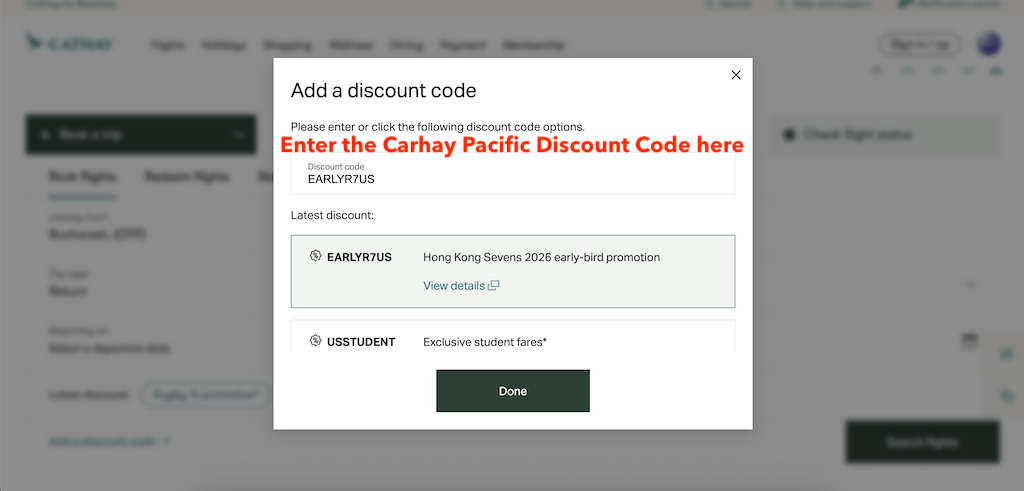
Cathay Pacific hides the promo box a little bit on the booking form, so it’s easy to miss if you don’t know where to look. Here’s a simple step-by-step guide to make sure your discount actually gets applied.
-
1On CathayPacific.com, stay on the “Book flights” tab. Choose your departure airport, destination, trip type (one-way or return), cabin class and number of passengers.
-
2Use the calendar to select your departure and return dates. This first screen only shows your basic search details, so don’t worry if you don’t see a price yet.
-
3Just under the date fields you’ll see “Latest discount” buttons (for example Rugby 7s promotion or Student offer). Directly below those, on the left, there’s a text link that says “Add a discount code →”. That’s the spot where you can apply your coupon.
-
4Click “Add a discount code →” and a small field will appear. Paste or carefully type your Cathay Pacific promo code into this box. Codes often mix letters and numbers and can be case-sensitive, so copying directly from our coupons page is usually safest.
-
5Once the code is in, keep it there and hit “Search flights”. Cathay Pacific will check your discount code against the route, dates and cabin you’ve selected, and any eligible discounted fares will be shown on the next screen.
-
6On the results page, compare the prices with and without the code (or look for any promo notes on the fare). If the price hasn’t changed or an error message appears, review the terms: many codes only work on specific routes, travel periods, fare classes or have a minimum spend.
Frequently Asked Questions about CATHAY PACIFIC
Does CATHAY PACIFIC Offer Discount Codes?
Currently, there are 2 discount codes available for CATHAY PACIFIC in November 2026, and one of the latest verified coupon codes is KRMEET12, offering up to 12% off.
What are the latest coupons and discount codes for CATHAY PACIFIC?
Currently there are the following active discount codes and promotional offers for CATHAY PACIFIC:
Coupons and Offers from stores similar to CATHAY PACIFIC


French Bee promo code: up to 20% off selected flight bookings
Offer valid for limited time. Use this code to save 20% off base fare for a selection of flights.



Agoda coupon code: up to 10% discount on eligible hotel reservations
Select your accommodation on Agoda and enter this code in the coupon section before paying.

Fly for less using a verified Emirates promo code BEBAC26 (last checked November 2026).

Book smarter with Expedia coupon CORPSHOP8 (checked November 2026) and get 8% off eligible stays, bundles, or experiences on expedia.com.

Plan your next stay for less: apply Hilton code FABRIC on hilton.com, last confirmed November 2026, for 10% off select room rates and packages.

Enter our tested ITA Airways promo code (BOWAZ)—validated on November 2026—to save 10% on eligible fares and add-ons at itairways.com.
Book flights with extra savings—use the KLM voucher code (KLM107ANNI), verified on November 2026, to get €60 off qualifying fares or add-ons at klm.com.

Fly smarter on your next long-haul trip with the verified Virgin Atlantic promo code (VAHSALE), checked on November 2026.

Heading to the Caribbean? View AIR CARAIBES offers
Book your next trip for less with a verified AVIS promo code (MUWA010), checked on November 2026.
Discount Code Expert for CATHAY PACIFIC

Content Editor
Horia reviews and updates this coupon page, checks active offers, validates promotional details, and edits the page content to keep the information accurate, clear, and up to date.
How we verify coupons and offers