
CENTARA HOTELS Discount Code & Coupons October 2026
Here are 4 verified CENTARA HOTELS discount codes, including an 33% off code, valid in October 2026.

Expired CENTARA HOTELS Coupons
How To Add a Centara Hotels Promo Code
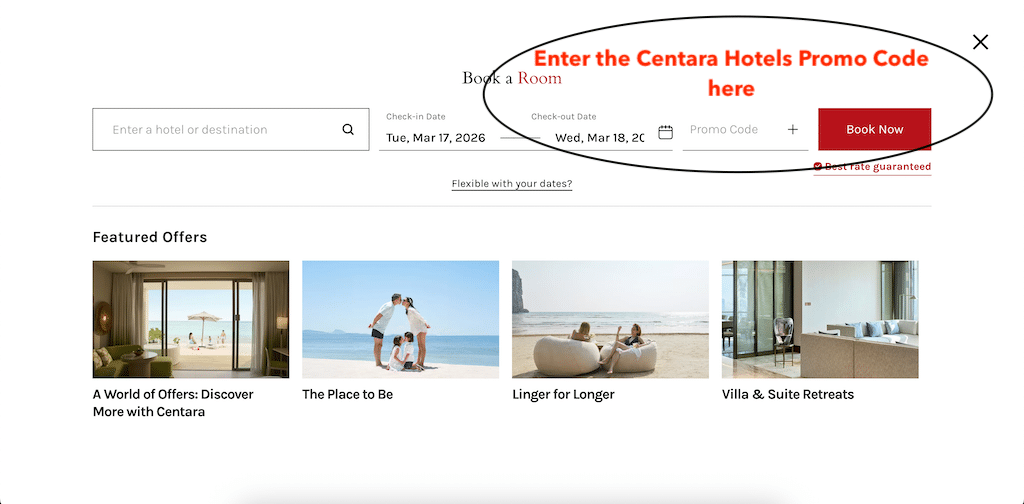
Using a Centara Hotels promo code is quite easy once you know where the field is. I checked the booking window, and the promo code box appears directly in the main reservation form, so you can add your discount before you search for available rooms.
-
1Start by opening the Book a Room booking panel on the Centara Hotels website. This is the section where you enter your stay details before moving to the room selection page.
-
2In the first field, type the hotel name or destination in the box labeled “Enter a hotel or destination.” Then choose your check-in and check-out dates.
-
3Once your travel dates are selected, look to the right side of the form. You will see a field clearly labeled “Promo Code.”
-
4Click into the Promo Code field and type or paste your Centara Hotels discount code. I usually recommend pasting the code directly, because even a small typo can stop it from being accepted.
-
5After entering the code, click the red Book Now button to continue. The website should then search for available rooms using your booking details and promotional code.
-
6On the next step, review the room rates carefully to make sure the discount has been applied. If the code works, the reduced rate should be reflected in the pricing or booking details.
Frequently Asked Questions about CENTARA HOTELS
Does CENTARA HOTELS Offer Discount Codes?
Currently, there are 2 discount codes available for CENTARA HOTELS in October 2026, and one of the latest verified coupon codes is SRG33, offering up to 33% off.
What are the latest coupons and discount codes for CENTARA HOTELS?
Currently there are the following active discount codes and promotional offers for CENTARA HOTELS:
Coupons and Offers from stores similar to CENTARA HOTELS




Discount Code Expert for CENTARA HOTELS

Content Editor
Horia reviews and updates this coupon page, checks active offers, validates promotional details, and edits the page content to keep the information accurate, clear, and up to date.